

How to update and import a configuration
Zitat von mpachmann am 27. Juni 2023, 15:21 Uhrhttps://doc.sophos.com/nsg/sophos-firewall/18.5/help/en-us/webhelp/onlinehelp/AdministratorHelp/BackupAndFirmware/ImportExport/BackupsImportExportUpdateConfiguration/index.html
You can export a configuration, update it, and import the updated configuration into Sophos Firewall.
This example uses a configuration with sensitive information, for example User.
- Export the configuration.
- Go to Backup and firmware > Import export.
- Select Export selective configuration.
- Enter
Userto search, select User, and click Apply selected items.Sophos Firewall exports the configuration as a
.tarfile.Here's an example:
- To extract the files, go to the Windows or Linux command-line console on your endpoint, go to the folder containing the
.tarfile, and enter the following command:tar -xvf <tarfilename>.tarThis exported file contains sensitive information, such as users' passwords. So, it contains the following files:
Entities.xmlhashFile.jsonpropertyfileHere's an example:
- Open the
.xmlfile in a text editor, such as Notepad, and make the configuration changes you want.- To compress the updated
.xmlfile and the other files into a.tarfile, enter the following command:tar -cvf <newtarfilename.tar> Entities.xml hashFile.json propertyfileHere's an example:
- On the web admin console, go to Backup and firmware > Import export, and import the
.tarfile.
- Enter the Secure storage master key.
Sophos Firewall imports the configuration.
You can export a configuration, update it, and import the updated configuration into Sophos Firewall.
This example uses a configuration with sensitive information, for example User.
- Export the configuration.
- Go to Backup and firmware > Import export.
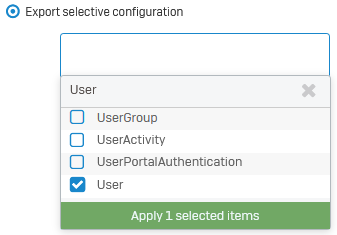
- Select Export selective configuration.
- Enter
Userto search, select User, and click Apply selected items.Sophos Firewall exports the configuration as a
.tarfile.Here's an example:
- To extract the files, go to the Windows or Linux command-line console on your endpoint, go to the folder containing the
.tarfile, and enter the following command:tar -xvf <tarfilename>.tarThis exported file contains sensitive information, such as users' passwords. So, it contains the following files:
Entities.xmlhashFile.jsonpropertyfile
Here's an example:

- Open the
.xmlfile in a text editor, such as Notepad, and make the configuration changes you want. - To compress the updated
.xmlfile and the other files into a.tarfile, enter the following command:tar -cvf <newtarfilename.tar> Entities.xml hashFile.json propertyfileHere's an example:

- On the web admin console, go to Backup and firmware > Import export, and import the
.tarfile.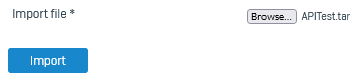
- Enter the Secure storage master key.
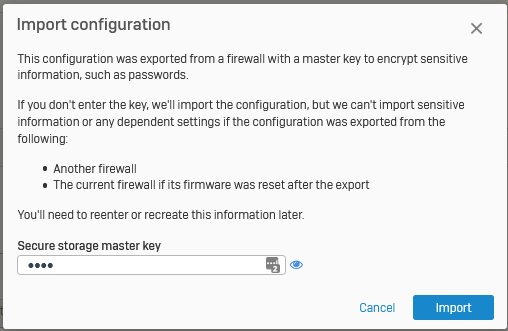
Sophos Firewall imports the configuration.