

Sophos XG and SG (UTM) SSL VPN Site-to-Site VPN Compatibility
Zitat von mpachmann am 10. Dezember 2025, 12:56 Uhrhttps://www.fastvue.co/sophos/blog/sophos-xg-sg-utm-ssl-site-site-vpn-compatibility/
One-way relationship
The two platforms can be connected by SSL site-to-site VPN, but only if the XG is the server and the SG is the client. The other way around does not work, despite my efforts. This may change going forward but this was the case as of July 2017 with SFOS 16.06.6 MR6 and SG 9.502-4 .
Configure Sophos XG VPN Settings (Server Side)
Let's start off by setting up the XG as this is the side that will receive the connection attempts from the SG side. This is the "server side".
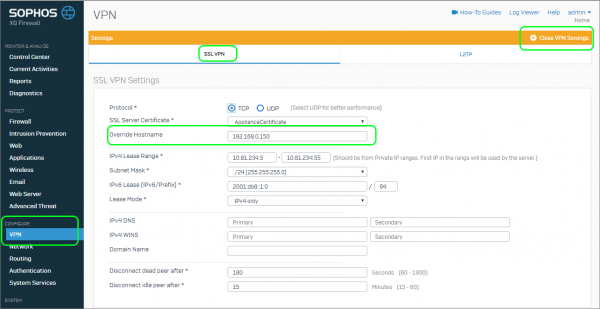
- Select Configure | VPN | Show VPN Settings | Override Host
- Specify the XG’s public IP address if there is no public DNS in use
Create the VPN Connection Server
SSL VPNs are easy to deploy because all of the server and client configuration is contained in a single configuration file that simply needs to be imported on the client side.
- Go to Configure | VPN | SSL VPN (site-to-site) | Server | Add
- Provide a Name
- Specify the Local (XG side) network
- Define and specify the Remote (SG side) network and click Save
- Download the Config File for deployment on the SG later
Create the Sophos XG Firewall Rules
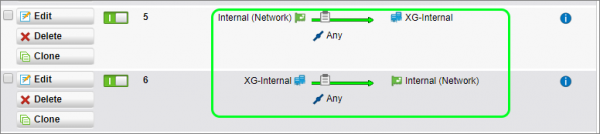
The VPN establishes the connection between the two firewalls, but without rules to explicitly allow the traffic to flow between the sites, no traffic would be allowed on either side. To configure two basic rules to allow full bi-directional communication between the two sites:
- Go to Protect | Firewall | Add new Firewall Rule | User / Network Rule
- Specify the following in the rule:
- Name
- Source Zone: Any
- Source Network: UTM Internal
- Destination Zone: Any
- Destination Network: XG internal
- Uncheck match Known Users
- Click Save
- Add new Firewall Rule | User / Network Rule
- Specify the following in the rule:
- Name
- Source Zone: Any
- Source Network: XG Internal
- Destination Zone: Any
- Destination Network: UTM Internal
- Uncheck match Known Users
- Click Save
Configure Sophos UTM VPN Settings (Client Side)
Next, we will configure the Sophos SG client to connect to the Sophos XG server. We start by importing the configuration file that was generated by Sophos XG.
- Go to Site-to-Site VPN | SSL | Connections | + New SSL Connection
- Select Client
- Upload the configuration file
- Uncheck the box for Automatic Firewall Rules (this does not work)
- Click Save
Configure the Sophos UTM Firewall Rules
Sophos XG has already been configured to allow the traffic, but the Sophos SG UTM needs a similar ruleset.
- Go to Network Protection | + New Rule
- Specify the following in the rule:
- Source: UTM Internal
- Destination: XG Internal
- Allow
- Advanced | Log Traffic
- Turn on the Rule
- + New Rule
- Specify the following in the rule:
- Source: XG Internal
- Destination: UTM Internal
- Allow
- Advanced | Log Traffic
- Turn on the Rule
You can now check the status of the VPN by going to Site-to-site VPN.
You should see that it is connected but that the source and destination subnets do not show up like you would expect them to. If you compare the image to a Sophos SG to SG tunnel, the subsets on either end are shown.
On the Sophos XG side, you can see the status by going to VPN | SSL VPN (site-to-site) | Server. The connection should look as follows:
Traffic is now able to flow between the two sites. The firewall logs on either side show this as the counters on the Sophos XG are updated.
Reporting on both Sophos SG and Sophos XG
Now that both sites are connected via a site-to-site VPN, you can install a Fastvue Sophos Reporter server on either network, and forward both Sophos UTM and Sophos XG web filtering logs to it for centralized consolidated web usage reporting. And yes, Fasvue Sophos Reporter supports both XG and SG platforms on the same deployment.
Conclusion
Traditionally, one would configure the "head office" as the server and the "branch office" as the client, but it is not a requirement.
Site-to-site VPNs between Sophos XG and SG platforms is definitely possible, just be mindful of the required client-server direction. Alternatively, you could also connect the two platforms together using IPSEC tunnels, but I'll leave that for another article.
https://www.fastvue.co/sophos/blog/sophos-xg-sg-utm-ssl-site-site-vpn-compatibility/
One-way relationship
The two platforms can be connected by SSL site-to-site VPN, but only if the XG is the server and the SG is the client. The other way around does not work, despite my efforts. This may change going forward but this was the case as of July 2017 with SFOS 16.06.6 MR6 and SG 9.502-4 .
Configure Sophos XG VPN Settings (Server Side)
Let's start off by setting up the XG as this is the side that will receive the connection attempts from the SG side. This is the "server side".
- Select Configure | VPN | Show VPN Settings | Override Host
- Specify the XG’s public IP address if there is no public DNS in use
Create the VPN Connection Server
SSL VPNs are easy to deploy because all of the server and client configuration is contained in a single configuration file that simply needs to be imported on the client side.
- Go to Configure | VPN | SSL VPN (site-to-site) | Server | Add
- Provide a Name
- Specify the Local (XG side) network
- Define and specify the Remote (SG side) network and click Save
- Download the Config File for deployment on the SG later

Create the Sophos XG Firewall Rules
The VPN establishes the connection between the two firewalls, but without rules to explicitly allow the traffic to flow between the sites, no traffic would be allowed on either side. To configure two basic rules to allow full bi-directional communication between the two sites:
- Go to Protect | Firewall | Add new Firewall Rule | User / Network Rule
- Specify the following in the rule:
- Name
- Source Zone: Any
- Source Network: UTM Internal
- Destination Zone: Any
- Destination Network: XG internal
- Uncheck match Known Users
- Click Save
- Add new Firewall Rule | User / Network Rule
- Specify the following in the rule:
- Name
- Source Zone: Any
- Source Network: XG Internal
- Destination Zone: Any
- Destination Network: UTM Internal
- Uncheck match Known Users
- Click Save

Configure Sophos UTM VPN Settings (Client Side)
Next, we will configure the Sophos SG client to connect to the Sophos XG server. We start by importing the configuration file that was generated by Sophos XG.
- Go to Site-to-Site VPN | SSL | Connections | + New SSL Connection
- Select Client
- Upload the configuration file
- Uncheck the box for Automatic Firewall Rules (this does not work)
- Click Save

Configure the Sophos UTM Firewall Rules
Sophos XG has already been configured to allow the traffic, but the Sophos SG UTM needs a similar ruleset.
- Go to Network Protection | + New Rule
- Specify the following in the rule:
- Source: UTM Internal
- Destination: XG Internal
- Allow
- Advanced | Log Traffic
- Turn on the Rule
- + New Rule
- Specify the following in the rule:
- Source: XG Internal
- Destination: UTM Internal
- Allow
- Advanced | Log Traffic
- Turn on the Rule
You can now check the status of the VPN by going to Site-to-site VPN.
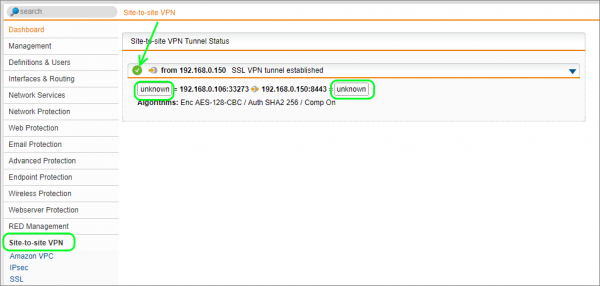
You should see that it is connected but that the source and destination subnets do not show up like you would expect them to. If you compare the image to a Sophos SG to SG tunnel, the subsets on either end are shown.
On the Sophos XG side, you can see the status by going to VPN | SSL VPN (site-to-site) | Server. The connection should look as follows:

Traffic is now able to flow between the two sites. The firewall logs on either side show this as the counters on the Sophos XG are updated.
Reporting on both Sophos SG and Sophos XG
Now that both sites are connected via a site-to-site VPN, you can install a Fastvue Sophos Reporter server on either network, and forward both Sophos UTM and Sophos XG web filtering logs to it for centralized consolidated web usage reporting. And yes, Fasvue Sophos Reporter supports both XG and SG platforms on the same deployment.
Conclusion
Traditionally, one would configure the "head office" as the server and the "branch office" as the client, but it is not a requirement.
Site-to-site VPNs between Sophos XG and SG platforms is definitely possible, just be mindful of the required client-server direction. Alternatively, you could also connect the two platforms together using IPSEC tunnels, but I'll leave that for another article.